Webhooks
Webhooks let Agenta notify another system when something changes. You can use them to update internal tools, sync deployed prompts into another service, or trigger downstream automation after a deployment.
When to use webhooks
Use a webhook when you want Agenta to push an event to your system.
Common use cases:
- update a service after a prompt deploy
- trigger a CI/CD job
- notify an internal platform tool
- sync prompt metadata into another store
If you want your application to fetch the latest prompt on demand, use Fetch Prompts via SDK/API.
Set up a webhook in the UI
- Open your project in Agenta.
- Go to
Settings. - Open the
Automationssection.
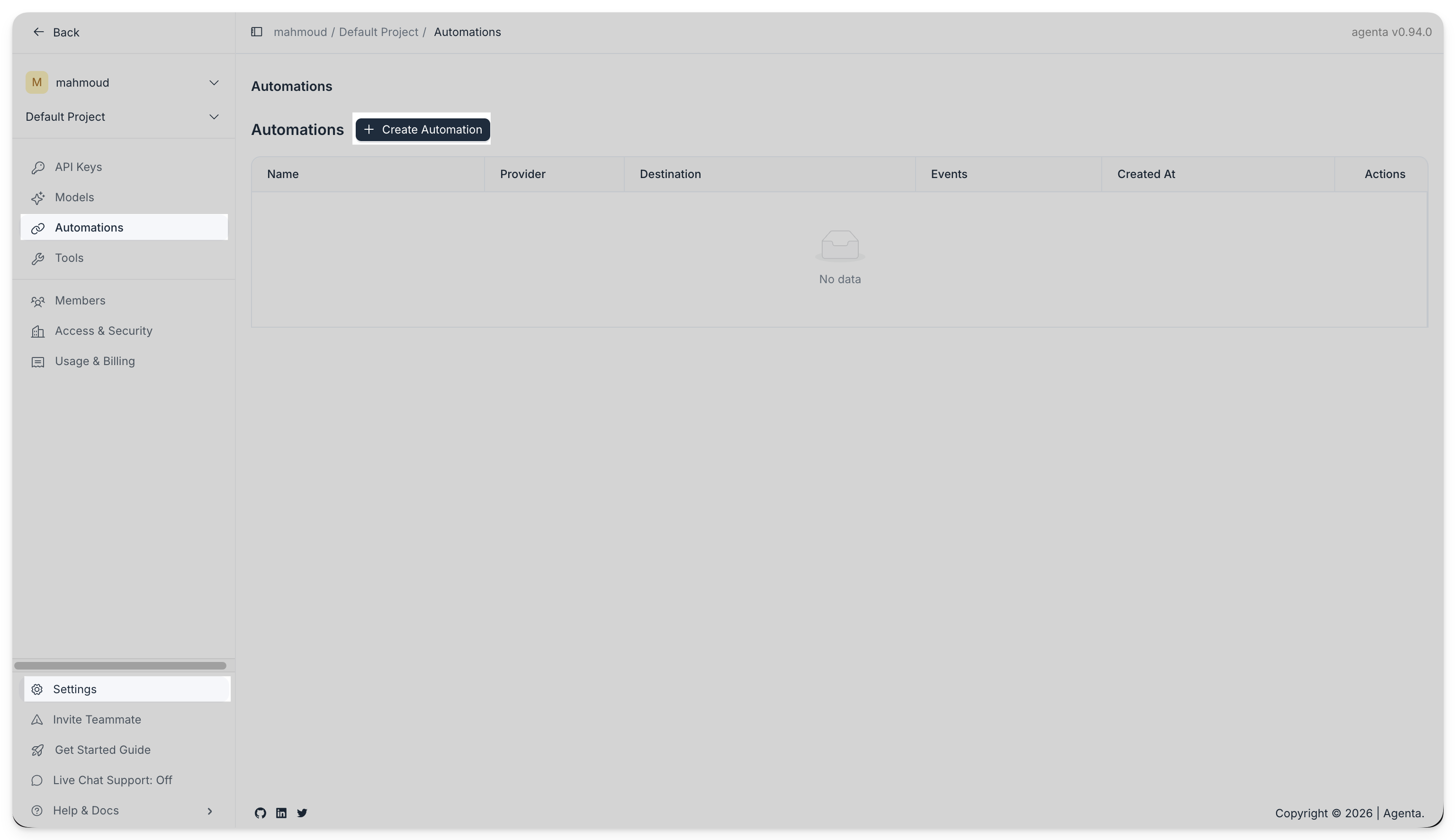
- Click
Create automation. - Choose
Webhook. - Enter your HTTPS endpoint.
- Choose an authentication mode:
Signatureif your receiver should verify an HMAC signatureAuthorization headerif you want Agenta to send a bearer token
- Select the events you want to subscribe to.
- Save the automation.
- Copy the secret when Agenta shows it. You will need it to verify future deliveries.
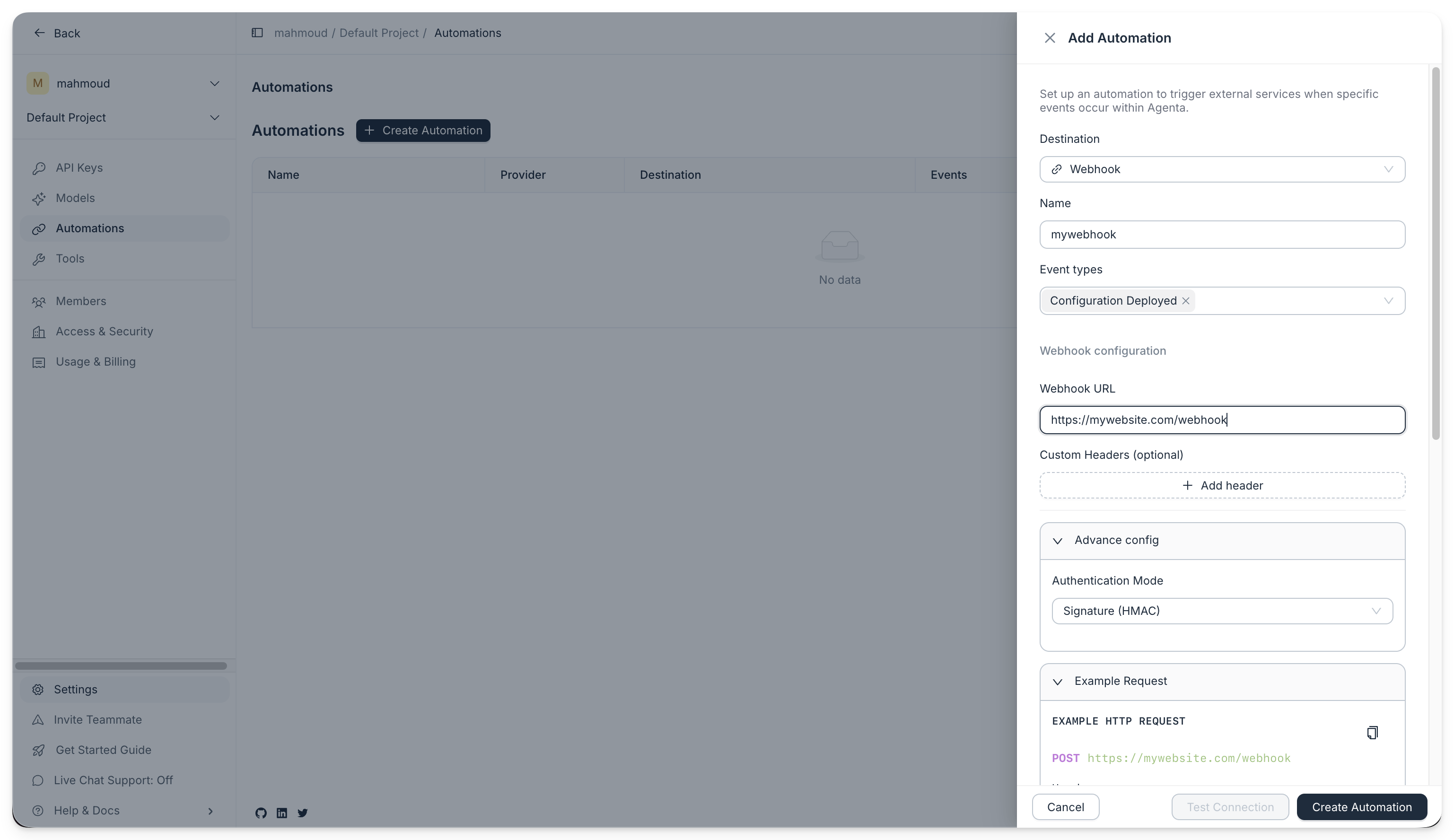
After you create the automation, Agenta sends an HTTP POST to your endpoint every time the selected event happens. For example, if you subscribe to deployment events, Agenta sends a delivery each time you deploy a new prompt revision.
What Agenta sends
Agenta sends a JSON body with three top-level objects:
event, which contains the event metadata and payloadsubscription, which identifies the automation that firedscope, which identifies the project
For environments.revisions.committed, the deployment details live in event.attributes.
references identifies the environment revision that was just committed.
state is the current value of data.references in that environment revision.
diff is the diff for that commit.
The overall request body looks like this:
{
  "event": {
    "event_id": "01961234-5678-7abc-9def-123456789abc",
    "event_type": "environments.revisions.committed",
    "timestamp": "2026-04-07T11:24:18.000Z",
    "created_at": "2026-04-07T11:24:18.000Z",
    "attributes": {
      "...": "deployment payload"
    }
  },
  "subscription": {
    "id": "01961234-aaaa-7abc-9def-123456789abc"
  },
  "scope": {
    "project_id": "01961234-bbbb-7abc-9def-123456789abc"
  }
}
Here are two concrete event.attributes examples.
Example 1: first deployment of a new app
{
  "user_id": "019315dc-a332-7ba5-a426-d079c43ab776",
  "references": {
    "environment": {
      "id": "019c2b74-d84f-7cf2-aff0-e45e116e26cb"
    },
    "environment_revision": {
      "id": "019cd9b8-e21c-7c73-82a2-099cb1352f19",
      "slug": "prod-0001",
      "version": "1"
    },
    "environment_variant": {
      "id": "019c2b74-d85c-7803-8a55-f12f2fc8f461"
    }
  },
  "state": {
    "references": {
      "customer-support-bot.revision": {
        "application": {
          "id": "019c2b74-d8b7-74e7-9f16-6a6a2c9cd111",
          "slug": "customer-support-bot"
        },
        "application_variant": {
          "id": "019c2b74-d8df-7f57-bb13-5e8c0c3f5222",
          "slug": "production"
        },
        "application_revision": {
          "id": "019cd9b8-e21c-7c73-82a2-099cb1352f19",
          "slug": "prompt-v1",
          "version": "1"
        }
      }
    }
  },
  "diff": {
    "created": {
      "customer-support-bot.revision": {
        "new": {
          "application": {
            "id": "019c2b74-d8b7-74e7-9f16-6a6a2c9cd111",
            "slug": "customer-support-bot"
          },
          "application_variant": {
            "id": "019c2b74-d8df-7f57-bb13-5e8c0c3f5222",
            "slug": "production"
          },
          "application_revision": {
            "id": "019cd9b8-e21c-7c73-82a2-099cb1352f19",
            "slug": "prompt-v1",
            "version": "1"
          }
        }
      }
    },
    "updated": {},
    "deleted": {}
  }
}
Example 2: deploying a new revision for an app that is already in the environment
{
  "user_id": "019315dc-a332-7ba5-a426-d079c43ab776",
  "references": {
    "environment": {
      "id": "019c2b74-d84f-7cf2-aff0-e45e116e26cb"
    },
    "environment_revision": {
      "id": "019cd9c9-a742-78e0-9c0d-a08da7df88a1",
      "slug": "prod-0008",
      "version": "8"
    },
    "environment_variant": {
      "id": "019c2b74-d85c-7803-8a55-f12f2fc8f461"
    }
  },
  "state": {
    "references": {
      "customer-support-bot.revision": {
        "application": {
          "id": "019c2b74-d8b7-74e7-9f16-6a6a2c9cd111",
          "slug": "customer-support-bot"
        },
        "application_variant": {
          "id": "019c2b74-d8df-7f57-bb13-5e8c0c3f5222",
          "slug": "production"
        },
        "application_revision": {
          "id": "019cd9c9-a742-78e0-9c0d-a08da7df88a1",
          "slug": "prompt-v8",
          "version": "8"
        }
      }
    }
  },
  "diff": {
    "created": {},
    "updated": {
      "customer-support-bot.revision": {
        "old": {
          "application": {
            "id": "019c2b74-d8b7-74e7-9f16-6a6a2c9cd111",
            "slug": "customer-support-bot"
          },
          "application_variant": {
            "id": "019c2b74-d8df-7f57-bb13-5e8c0c3f5222",
            "slug": "production"
          },
          "application_revision": {
            "id": "019cd9a1-3fd6-7144-9c0d-fcbf0a6fd777",
            "slug": "prompt-v7",
            "version": "7"
          }
        },
        "new": {
          "application": {
            "id": "019c2b74-d8b7-74e7-9f16-6a6a2c9cd111",
            "slug": "customer-support-bot"
          },
          "application_variant": {
            "id": "019c2b74-d8df-7f57-bb13-5e8c0c3f5222",
            "slug": "production"
          },
          "application_revision": {
            "id": "019cd9c9-a742-78e0-9c0d-a08da7df88a1",
            "slug": "prompt-v8",
            "version": "8"
          }
        }
      }
    },
    "deleted": {}
  }
}
Agenta also sends system headers like these:
Content-Type: application/json
User-Agent: Agenta-Webhook/1.0
X-Agenta-Event-Type: environments.revisions.committed
X-Agenta-Delivery-Id: <delivery_id>
X-Agenta-Event-Id: <event_id>
Idempotency-Key: <delivery_id>
Available event types
Agenta emits events for both read access and Git-style revision lifecycle changes. You can subscribe to any subset of the events below.
Revision lifecycle events
Each major entity that has revision history exposes the same five action events:
| Action | Emitted when |
|---|---|
retrieved | A revision is retrieved by reference (slug or id) |
fetched | A revision is fetched by id (GET /<domain>/revisions/{id}) |
queried | A list of revisions is returned from POST /<domain>/revisions/query |
logged | A revision history log is returned from POST /<domain>/revisions/log |
committed | A new revision is committed (direct commit, simple-service create/edit, deploy, fork, etc.) |
The supported domains and event names are:
applications.revisions.{retrieved,fetched,queried,logged,committed}queries.revisions.{retrieved,fetched,queried,logged,committed}testsets.revisions.{retrieved,fetched,queried,logged,committed}evaluators.revisions.{retrieved,fetched,queried,logged,committed}environments.revisions.{retrieved,fetched,queried,logged,committed}
Revision read events (retrieved, fetched, queried, and logged) carry references (the artifact, variant, and revision identifiers — partial when the response does not expose all fields), count, and user_id. Commit events carry references, user_id, and optional message, but do not include count. The environments.revisions.committed event additionally carries state and diff describing the committed configuration, as shown in the examples above.
For list events (queried, logged), references is an array capped at 1000 entries while count reflects the uncapped total.
Read events for traces and testcases
traces.fetched— fired byGET /traces/{trace_id}(carriestrace_id) andGET /traces/(carries cappedtrace_ids)traces.queried— fired byPOST /traces/query(carries cappedtrace_ids)testcases.fetched— fired byGET /testcases/{testcase_id}(carriestestcase_id) andGET /testcases/(carries cappedtestcase_ids)testcases.queried— fired byPOST /testcases/query(carries cappedtestcase_ids)
Read events always carry user_id and count. They are only emitted when count > 0.
System events
webhooks.subscriptions.tested— fired when you clickSend teston a webhook subscription
Authentication modes
Using signature mode
Use signature mode when the receiver should verify that the request really came from Agenta and that the payload was not changed in transit.
Agenta signs each delivery and sends:
X-Agenta-Signature: t=<unix_ts>,v1=<hex_hmac>
Agenta computes the signature as:
HMAC_SHA256(secret, "{timestamp}.{raw_body}")
The important detail is raw_body. Agenta signs the exact JSON string it sends over HTTP.
To verify the signature:
- Read the raw request body before modifying it.
- Parse
t=andv1=fromX-Agenta-Signature. - Compute
HMAC_SHA256(secret, "{timestamp}.{raw_body}"). - Compare your result with
v1=using constant time comparison. - Reject old timestamps to reduce replay risk.
- Python
- TypeScript
import hashlib
import hmac
import os

from fastapi import FastAPI, HTTPException, Request

app = FastAPI()
WEBHOOK_SECRET = os.environ["AGENTA_WEBHOOK_SECRET"]


@app.post("/webhook")
async def webhook(request: Request):
    signature_header = request.headers.get("x-agenta-signature")
    if not signature_header:
        raise HTTPException(status_code=401, detail="Missing signature")

    parts = dict(piece.split("=", 1) for piece in signature_header.split(","))
    timestamp = parts.get("t")
    received = parts.get("v1")
    if not timestamp or not received:
        raise HTTPException(status_code=401, detail="Malformed signature")

    raw_body = (await request.body()).decode("utf-8")
    expected = hmac.new(
        WEBHOOK_SECRET.encode("utf-8"),
        f"{timestamp}.{raw_body}".encode("utf-8"),
        hashlib.sha256,
    ).hexdigest()

    if not hmac.compare_digest(received, expected):
        raise HTTPException(status_code=401, detail="Invalid signature")

    payload = await request.json()
    return {"received": True, "payload": payload}
export default async function handler(req: Request): Promise<Response> {
  const signatureHeader = req.headers.get("x-agenta-signature")
  if (!signatureHeader) {
    return new Response("Missing signature", {status: 401})
  }

  const parts = Object.fromEntries(
    signatureHeader.split(",").map((piece) => {
      const [key, ...rest] = piece.split("=")
      return [key, rest.join("=")]
    }),
  )

  const timestamp = parts.t
  const received = parts.v1
  if (!timestamp || !received) {
    return new Response("Malformed signature", {status: 401})
  }

  const rawBody = await req.text()
  const secret = process.env.AGENTA_WEBHOOK_SECRET
  if (!secret) {
    return new Response("Server misconfigured", {status: 500})
  }

  const key = await crypto.subtle.importKey(
    "raw",
    new TextEncoder().encode(secret),
    {name: "HMAC", hash: "SHA-256"},
    false,
    ["sign"],
  )

  const signatureBytes = new Uint8Array(
    await crypto.subtle.sign(
      "HMAC",
      key,
      new TextEncoder().encode(`${timestamp}.${rawBody}`),
    ),
  )

  const expected = Array.from(signatureBytes)
    .map((b) => b.toString(16).padStart(2, "0"))
    .join("")

  if (expected !== received) {
    return new Response("Invalid signature", {status: 401})
  }

  return new Response(JSON.stringify({received: true}), {
    status: 200,
    headers: {"Content-Type": "application/json"},
  })
}
Here is a working example hosted on Val Town.
Authorization header mode
In authorization mode, Agenta sends your stored secret as the Authorization header.
Authorization: Bearer <token>
Use this mode when your target system already expects a bearer token and does not need HMAC verification.
Troubleshooting
Signature mismatch
Check these first:
- use the exact secret shown when you created the automation
- verify the exact raw body, not a re-serialized JSON object
- make sure you parse the signature header as
t=...,v1=... - confirm you use HMAC-SHA256
HTTPS is required
Agenta expects webhook URLs to use HTTPS. If you test locally, use a tunnel such as Cloudflare Tunnel or ngrok.
Retries
If your endpoint returns a non 2xx response or times out, Agenta retries the delivery.